Skip to content
MBA Support
  • MBA Site
  • Facilities
    • Booking & Availability
    • Payments & Booking Issues
    • Facilities & Operations
    • Contactless Booking e-Voucher
  • Academy
    • Getting Started and Age Requirements
    • Improvement and Learning
    • Lesson Credits and Enrollment
    • Attire and Schedule
    • Coaching and Class Details
    • Schedule, Top Up & Cancel Classes
  • Others
  • Contact Us
Search
MBA Support
  • MBA Site
  • Facilities
    • Booking & Availability
    • Payments & Booking Issues
    • Facilities & Operations
    • Contactless Booking e-Voucher
  • Academy
    • Getting Started and Age Requirements
    • Improvement and Learning
    • Lesson Credits and Enrollment
    • Attire and Schedule
    • Coaching and Class Details
    • Schedule, Top Up & Cancel Classes
  • Others
  • Contact Us
Search

How do I purchase the Contactless Booking e-Voucher? 

A

How do I purchase the Contactless Booking e-Voucher? 

Category: Contactless Booking e-Voucher
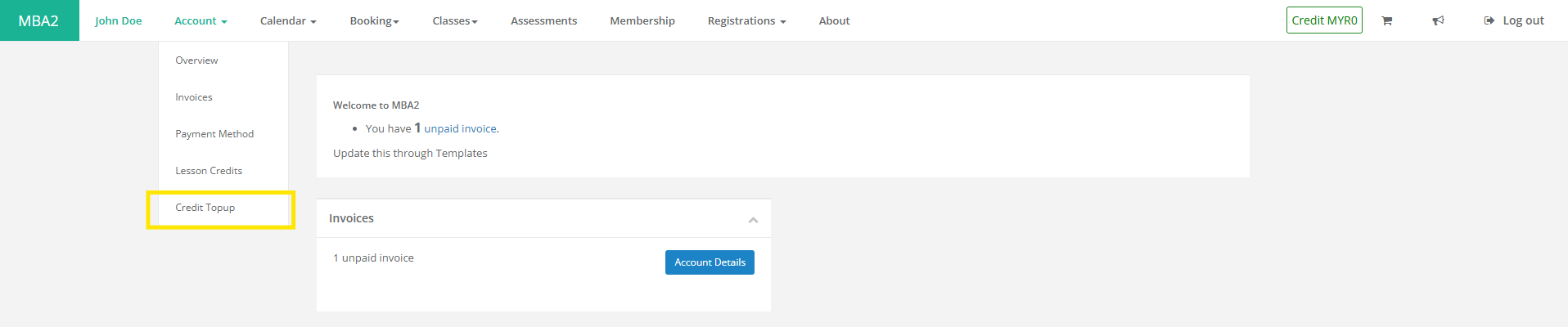
You need to first sign up with Customer Portal, then you in your dashboard – click on the Accounts tab, and select Credit Topup. Then Select the package – Bronze, Silver or Gold Package. Once payment done, it will be instantly credited into your account for immediate use
Post navigation
← Previous FAQ
Next FAQ →